








Download: Showcontroller - Stand Alone CAPTURE Visualization Stage
- Brand:
- Showcontroller
- Product model:
- Stand Alone CAPTURE Visualization Stage
- Category:
- Showcontroller Laser Control Software
- Years:
- 2022 - today
Demo-Stage completely stand alone made in Capture. Allows for real-time visualization of lasers from Showcontroller.
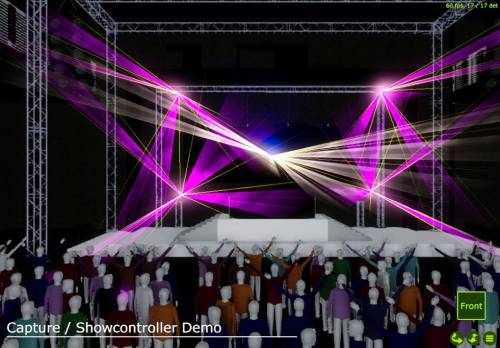
This stage has been designed to provide additional visualization options to Showcontroller and showcase some of the possibilities with visualizing laser content in Capture. This Demo stage handles 5 laser outputs, but of course more are possible in the Capture full version.
The stage has been designed by Elliot Baines from Spiralstagelighting (he is a master in Capture, see his work on www.spiralstagelighting.com)
How to activate the Visualization:
- Load a show in Showcontroller RealTime
- Start-up the Capture Demo Stage in this download
- Select Capture as Visualizer in View -> Visualizer -> Capture
- make sure to enable VIS in the left toolbar (if it is active deactivate it and reactivate it once after you changed the visualizer settings).
- press play and the show is visualized on the Capture Demo Stage.
Here is a tutorial video on how to get Capture linked to Showcontroller (it's pretty easy):https://www.youtube.com/watch?v=iX5emt1wPsY
You don't have to do the config side in Capture with this Demo Vis, as it's already been pre-set.
The stage has been designed by Elliot Baines from Spiralstagelighting (he is a master in Capture, see his work on www.spiralstagelighting.com)
How to activate the Visualization:
- Load a show in Showcontroller RealTime
- Start-up the Capture Demo Stage in this download
- Select Capture as Visualizer in View -> Visualizer -> Capture
- make sure to enable VIS in the left toolbar (if it is active deactivate it and reactivate it once after you changed the visualizer settings).
- press play and the show is visualized on the Capture Demo Stage.
Here is a tutorial video on how to get Capture linked to Showcontroller (it's pretty easy):https://www.youtube.com/watch?v=iX5emt1wPsY
You don't have to do the config side in Capture with this Demo Vis, as it's already been pre-set.
More related downloads
Showcontroller Wallpaper
from 2024 to * 
Blender Preset Template for Showcontroller
from 2019 to * 
Showcontroller Test Picture Show
from 2019 to * 
Showcontroller - Node Mode 16bit, 27Ch - GrandMA2 profile
from 2026 to *

Showcontroller - Version 3.4 - Full Version
from 2026 to * 

Showcontroller DMX Chart - 16 bit, 27 Channels - Node Mode
from 2026 to *